Computers are stupid
Yeah, I mean it!
Nowadays in the age of AGI is difficult to say these words and nobody will take you seriously but I think we should reconsider what the machines we use actually are.
I was inspired from this video from Veritasium.
The first computers were programmed by hand, by directly wiring circuits! The first time I read this it blown my mind since I was used for over 18 years of my life to write code and never dug up into the circuitry that animates all the machines we daily use.
As Derek says in the video everything started at the beginning of the last century with Triodes.
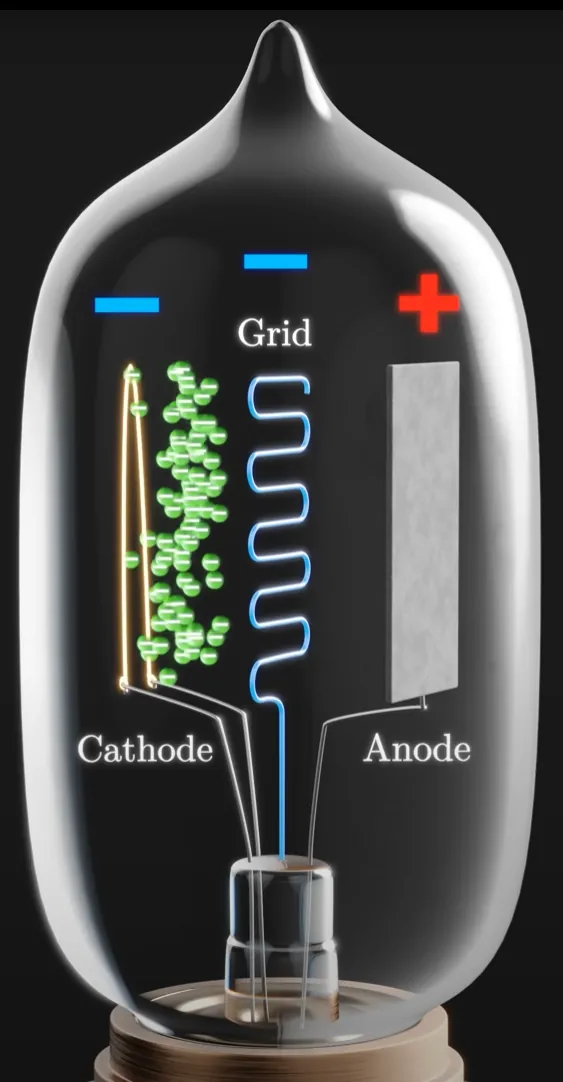
A triode is a type of vacuum tube used to amplify or switch electrical signals.
It has three main parts inside a vacuum-sealed glass tube:
- Cathode – Heated metal that emits electrons.
- Anode (Plate) – Positively charged; attracts electrons from the cathode.
- Grid – A wire mesh between the cathode and anode that controls the flow of electrons.
So the grid controls the flow, like a valve, we could control the flow of electrons in a circuit, it was the first ever "transistor"!
The first ever connection among computing and electronics (since we already had phisical calulators by that time, for istance Turing's) happened in 1937, when George Stibitz built Model K the first ever half-adder, a simple circuit that could sum up 2 bits.
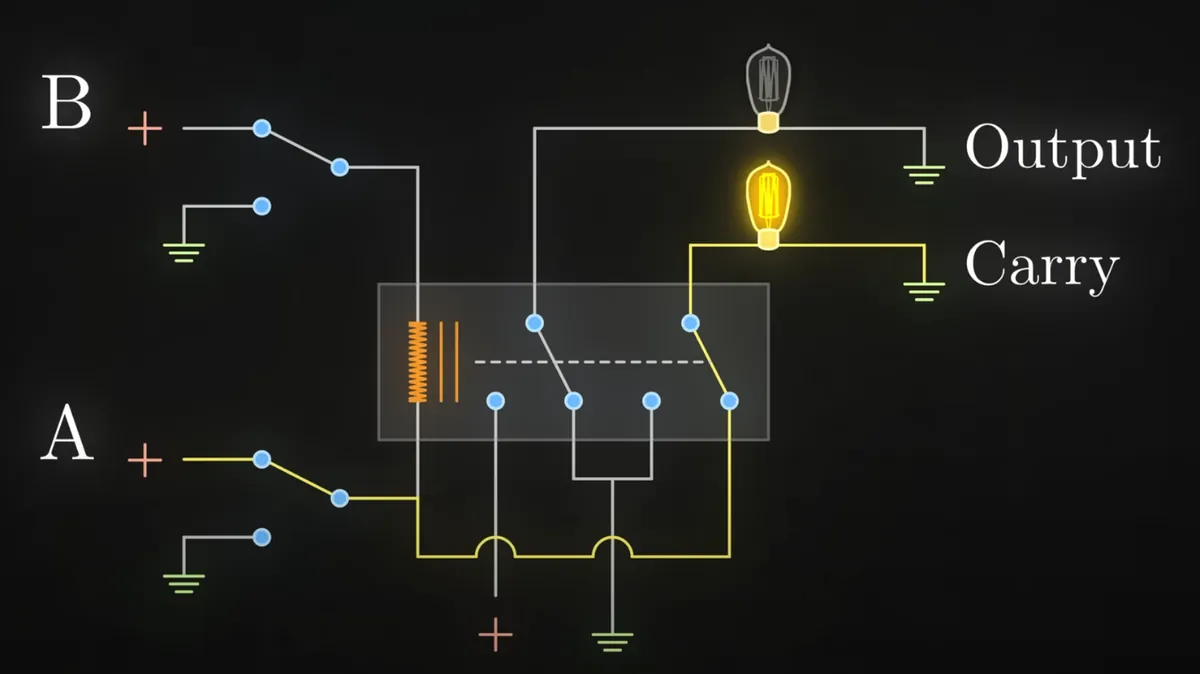
If only A or B are closed the "output" lightbulb will turn on, meaning 01 (1 in binary), but if you close both, the "carry" lightbulb will turn on indicating 10 (which is 2 in binary).
This was a breakthrough as it gave a way of manipulating data represented as binary numbers through electronic circuits and logical gates.
Using these means in 1945 ENIAC was built, the first ever entirely electrical computer. It had no stored programs and programming was done by physically rewiring the machine, plugging cables and setting switches. Each "instruction" was a circuit path, not a code.

Eniac weighed more than 27 tons, was roughly 2 m tall,1 m deep, and 30 m long, occupied 28 m2 and consumed 150 kW of electricity.
So not the best in terms of efficiency even though it was the fastest computer ever built and contributed to the development of the H bomb where difficult computation were required.
Soon transistors replaced triodes primarily due to their superior characteristics in size, power consumption, durability, and reliability.
In the 1950s what is know as "Von Neumann architecture" got widespread, whose concept is still at the base of modern computers.
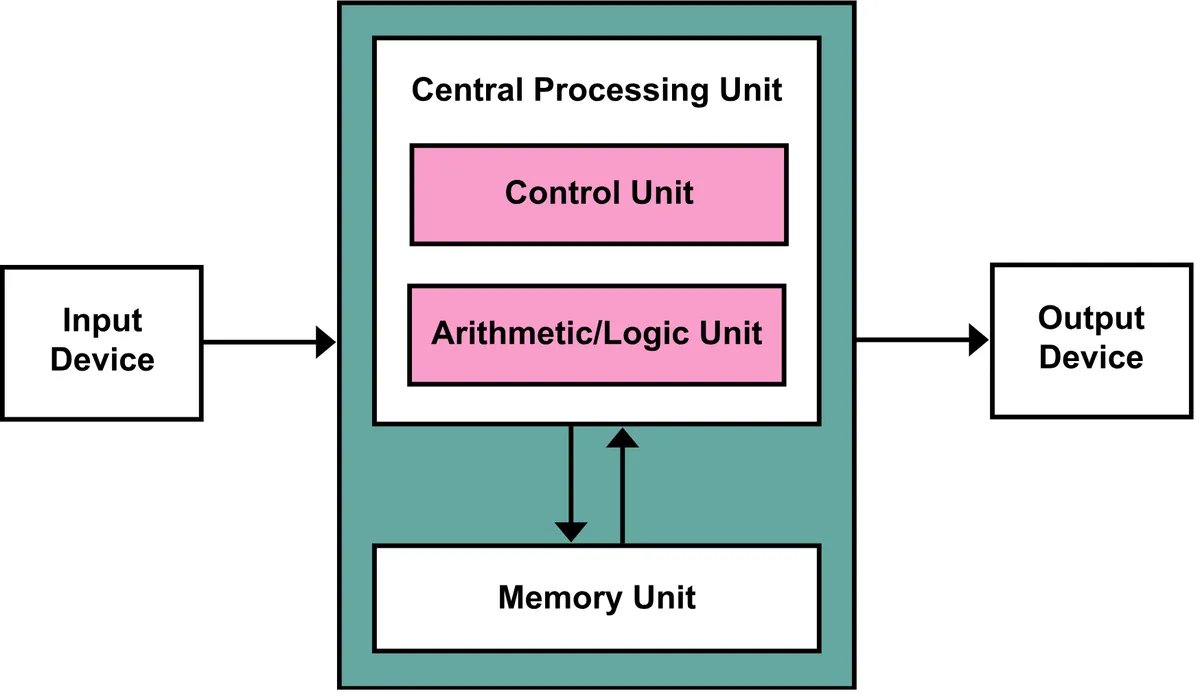
There's much electronics going on here so I won't deep down but basically circuits, lots of them, and i mean LOTS!
Programs and data were stored in memory (for istance with electronic cathodes) so you no longer had to rewire the machine you could directly enter instructions, you could now change programs without changing hardware, a huge leap in flexibility.
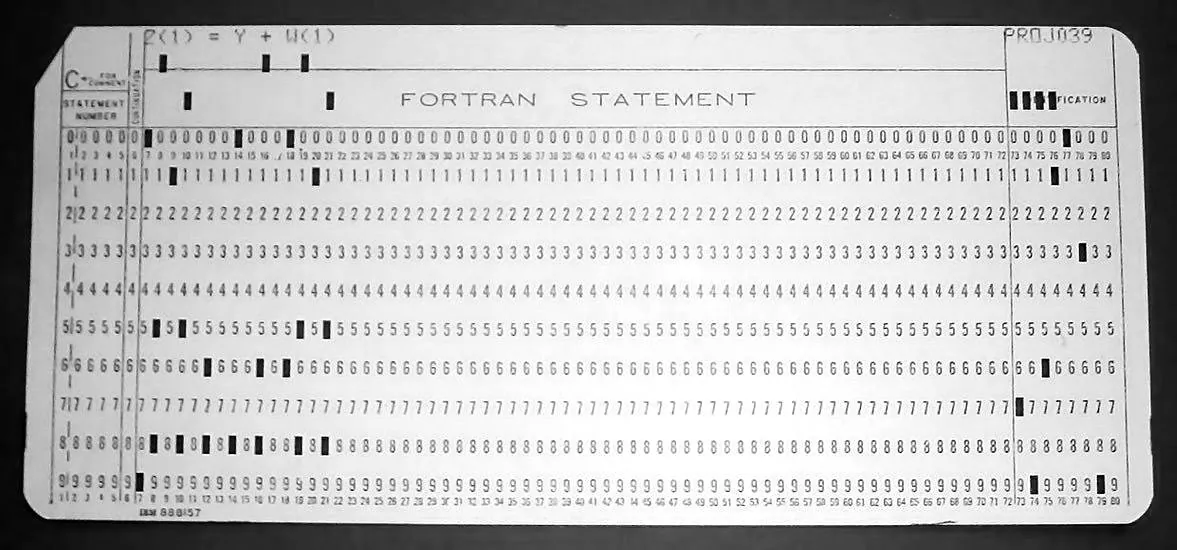
Programs were written on a piece of paper at first. Once debugged on paper, each line would become a single punch card that contained the mnemonic instruction, the parameters for the instruction and finally a field for comments. Each card could hold around 80 characters so it was possible to comment the code to quite some degree. But since memory was scarce, even mainframes only had a few dozens kilobytes of memory back then, commenting was quite a luxury.
Each column of the card passed over metal brushes on one side and metal rollers underneath. If a hole was present: the brush touched the roller, completing an electrical circuit.
How we arrived at keyboard and screen?
To move beyond punch cards, engineers began connecting "terminals" to mainframes. Devices like the Teletype Model 33 had a typewriter-like keyboard and printed output on paper. You’d type a line, it sent electrical signals (serial bits) to the computer, output printed back to you.
As computers shrank and displays were developed, keyboard-based input became practical and standard. Each keypress closes a switch, generating a scancode (digital signal). A keyboard microcontroller (normally flashed using an EPROM) sends the scancode to the CPU. The OS or program interprets the code as a character or command.
In 1970s CRT-based (Cathode Ray Tube) video terminals like the DEC VT100 combined a keyboard with a screen. Users could type directly into the machine, and see their code as they wrote it. This ushered in interactive computing, replacing punch cards.
The CRT terminals themselves had a controller (CRTC, written for istance in assembly) that controlled horizontal and vertical sync for raster scan, tracked current row/column on the screen, determined which character to draw at each position and which scanline within that character.
A recurring pattern
As we have seen so far every mean was used to make the programmers job easier. From hardware coding, to the first punch cards, to flashing instructions into electronic memory and give it to the machine. The goal is always the same, have sequences of 1s and 0s that the circuitry in the machine can understand and execute.
This process is called "bootstrapping", programmers realized it was easier to add a layer of abstraction to make the code more human-readable so you would have to make the painstaking work just once. You'd have to write an "assembler" in binary code and then use it to convert human-readable code into raw bits to give it to the machine.
This way you could reuse the same assembler to write even more complex assemblers or add another layer of abstraction by writing a "high level programming language" like C and so forth.
But ultimately, everything a computer receives, every bit of code, eventually becomes a binary number.
Example in assembly (x86 CPU):
MOV AX, 5 → 10111000 00000101 00000000
This binary stream goes into the CPU. The CPU recognizes a specific pattern, instruction (10111000), and is built to respond to it, it has hardwired circuits for each instruction.
How does the CPU recognize the patterns?
Inside the CPU is a special circuit called the instruction decoder.
It takes the opcode bits, routes them through a network of logic gates, matches the binary pattern against known opcodes and activates specific internal circuits.
An opcode (operation code) is a fixed-length binary pattern inside the machine instruction.
The CPU's instruction set architecture (ISA) defines exactly which binary sequences mean what.
Example (x86 simplified):
Opcode      Asm Meaning
10111000    MOV immediate to AX
00000001    ADD registers
11101011    JMP (jump)
How matching happens?
The decoder is basically a big combinational logic circuit (think of many AND/OR/NOT gates wired together).
Each unique opcode pattern activates a specific set of control signals.
These signals tell the rest of the CPU what to do: - Which registers to use - What ALU operation to perform - Whether to read/write memory - How to update the program counter
Example with a Simple Decoder
| Opcode (3 bits) | Instruction      | Meaning                    |
| --------------- | ---------------- | -------------------------- |
| 000             | NOP              | Do nothing                 |
| 001             | LOAD A, \[addr]  | Load register A            |
| 010             | STORE A, \[addr] | Store register A           |
| 011             | ADD A, B         | Add register B to A        |
| 100             | SUB A, B         | Subtract register B from A |
| 101             | JMP addr         | Jump to address            |
| 110             | AND A, B         | Bitwise AND                |
| 111             | OR A, B          | Bitwise OR                 |
So every combination of the 3 bits will give a different instruction and this is quite simple to do with boolean logic:
| Instruction | Opcode bits | Control Signal Logic Expression     |
| ----------- | ----------- | ----------------------------------- |
| NOP         | 000         | NOP = NOT O2 AND NOT O1 AND NOT O0  |
| LOAD\_A     | 001         | LOAD\_A = NOT O2 AND NOT O1 AND O0  |
| STORE\_A    | 010         | STORE\_A = NOT O2 AND O1 AND NOT O0 |
| ADD         | 011         | ADD = NOT O2 AND O1 AND O0          |
| SUB         | 100         | SUB = O2 AND NOT O1 AND NOT O0      |
| JMP         | 101         | JMP = O2 AND NOT O1 AND O0          |
| AND         | 110         | AND = O2 AND O1 AND NOT O0          |
| OR          | 111         | OR = O2 AND O1 AND O0               |
Fetch/Execute Cycle
Every instruction follows a cycle:
| Step        | What Happens                                                                    |
| ----------- | ------------------------------------------------------------------------------- |
| **Fetch**   | CPU reads instruction from memory (address from Program Counter)                |
| **Decode**  | Instruction decoder figures out what operation to perform                       |
| **Execute** | CPU sends signals to ALU, registers, memory, etc., to carry out the instruction |
This cycle runs billions of times per second on modern CPUs (GHz).
What happens when an instruction is executed?
The control unit sends electric signals across the CPU and these signals turn transistors on/off.
Transistors form logic gates (AND, OR, NOT, etc.)
These gates control things like: - Which data to move - What operation to perform - What to store where
It's just electrons flowing, controlled by the patterns in the instruction.
Every valid instruction is hardwired into the silicon via millions (or billions) of logic gates.
The CPU doesn’t “think” it reacts to patterns of bits, just like a light switch flips when voltage is applied.